
Design Principles: The Non-Negotiable Foundation of Great Graphic Design
- cmadolla
- Feb 11
- 4 min read

If you are currently hoping to start your Graphic Design journey and want to improve as a graphic designer, you must master the basics:
Behind every professional poster, logo, website, or brand identity are core design principles that guide structure, clarity, and visual impact. These principles are the foundation of all effective visual communication.
Master them, and your work improves immediately. Ignore them, and your designs will always feel “off.”
Let’s break them down.
1. Alignment – Nothing Should Be Random
Alignment is one of the fastest ways to tell if someone is a beginner or a professional.
Alignment means every element in your design should have a visual connection to something else. Nothing should feel randomly placed.
When alignment is correct:
The layout feels organized.
The design looks intentional.
The content is easier to read.
When alignment is poor:
The design feels messy.
The viewer feels visual tension.
The message becomes harder to understand.

Good alignment vs Bad alignment
Types of Alignment
Left alignment – Most common and easiest to read.
Center alignment – Useful for formal or minimal designs.
Right alignment – Used less frequently but powerful when intentional.
Justified alignment – Creates clean blocks of text (used carefully).
Why Alignment Matters
Humans naturally seek order. When elements line up properly, the brain processes information faster. Misalignment creates friction.
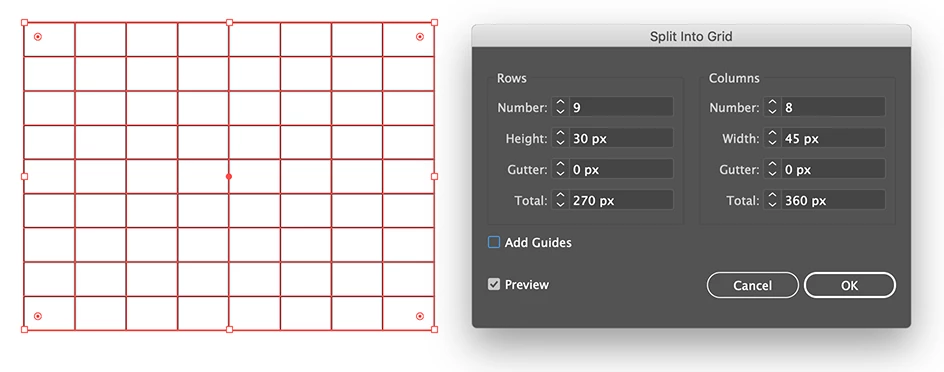
Professional designers use grid systems to maintain consistent alignment. Grids help control margins, spacing, and placement.
If you want your work to instantly improve, start by fixing alignment.
2. Hierarchy – Control What People See First
Hierarchy determines how information is consumed.
When someone looks at your design, you should control the order in which they see things:
Headline
Subheadline
Supporting text
Call to action
You create hierarchy through:
Size (bigger = more important)
Weight (bold vs light)
Color contrast
Placement
If everything looks equally important, nothing is important.
Clear hierarchy makes your design easy to understand within seconds.

3. Contrast – Create Visual Interest
Contrast prevents boredom.
Contrast can be created through:
Light vs dark
Large vs small
Bold vs thin
Serif vs sans-serif
Color opposites
Without contrast, designs feel flat and lifeless.
But contrast must be intentional. Too little feels dull. Too much feels chaotic.
The goal is balance with impact.

4. Balance – Stability in Design
Balance refers to the distribution of visual weight in a layout.
Every element carries visual weight based on:
Size
Color intensity
Texture
Position
Shape
If one side of the design feels heavier than the other, it creates discomfort.
Types of Balance
Symmetrical Balance
Equal visual weight on both sides.
Feels stable, formal, and structured.
Common in corporate and luxury branding.
Asymmetrical Balance
Unequal elements that still feel balanced.
Feels dynamic and modern.
Often used in contemporary design.
Why Balance Matters
White space (also called negative space) is one of the most misunderstood design principles.
White space is not wasted space. It is intentional space that improves clarity and elegance.
It:
Improves readability
Reduces clutter
Directs attention
Creates sophistication
Beginners often try to fill every area with text or graphics. This makes designs look crowded.
White space allows elements to breathe.
Luxury brands use large amounts of white space because it communicates confidence and clarity.
If your design feels crowded, remove elements before adding more.
Space adds power.

5. Repetition – Build Consistency
Repetition strengthens unity in a design.
Repetition means using the same visual elements consistently throughout your layout.
This includes:
Fonts
Colors
Spacing patterns
Icon styles
Line weights
Shapes
Repetition creates rhythm and cohesion.
In branding especially, repetition builds recognition. A consistent color palette and typography system create trust and familiarity.
Without repetition, designs feel disconnected and unpolished.
Professional designers limit their visual elements and repeat them strategically.

6. White Space – The Power of Breathing Room
White space (also called negative space) is one of the most misunderstood design principles.
White space is not wasted space. It is intentional space that improves clarity and elegance.
It:
Improves readability
Reduces clutter
Directs attention
Creates sophistication
Beginners often try to fill every area with text or graphics. This makes designs look crowded.
White space allows elements to breathe.
Luxury brands use large amounts of white space because it communicates confidence and clarity.
If your design feels crowded, remove elements before adding more.
Space adds power.

Why These Principles Matter
If you want to become a skilled graphic designer, fundamentals are everything.
Trends change.Software updates.Styles evolve.
Principles remain constant.
When you understand design principles:
You design with confidence.
You solve problems more effectively.
You make intentional decisions.
You critique your own work better.
You stand out from beginners.
Fundamentals make you adaptable. You can design for any industry because you understand structure.
This is especially important if you plan to build a branding business. Clients do not just want “nice graphics.” They want clarity, consistency, and communication.
That comes from fundamentals.
How to Practice Design Principles Daily
Improvement does not happen by watching tutorials only. It happens through active practice.
Here’s a simple training method:
Find a professional design (poster, website, brand).
Analyze it.
How is alignment used?
What creates hierarchy?
Where is contrast applied?
How is balance maintained?
What elements repeat?
How is white space used?
Recreate it from scratch.
Compare your version.
Do this consistently, and your eye will sharpen.
Design is a skill developed through repetition and intentional study.
Common Beginner Mistakes to Avoid
Using too many fonts
Overusing colors
Ignoring alignment
Filling every space
Making everything bold
Adding effects without purpose
If you want clean work, simplify.
Clarity always wins.
Final Thoughts
raphic design is not about decoration. It is about communication.
Design principles are the foundation of that communication. They bring order, clarity, and impact to visual work.
If you feel stuck or doubt your improvement, return to the basics.
Master alignment.Control hierarchy.Use contrast intentionally.Maintain balance.Repeat consistently.Respect white space.
Everything else builds on this foundation.
The designers who grow are not the ones who chase trends. They are the ones who master fundamentals.
If you are serious about becoming better, start here — and practice every day.


Comments